AI is already inside many businesses.
Employees use it to draft emails, summarise documents, analyse information, write code, prepare reports, and solve everyday problems. Often, they start using these tools long before the business has formally decided how AI should fit into its operations.
That creates a new challenge.
The question is no longer simply:
Should our business use AI?
It is:
How can our business use AI without losing control over its data, decisions, and workflows?
This is where the idea of shadow AI becomes important.
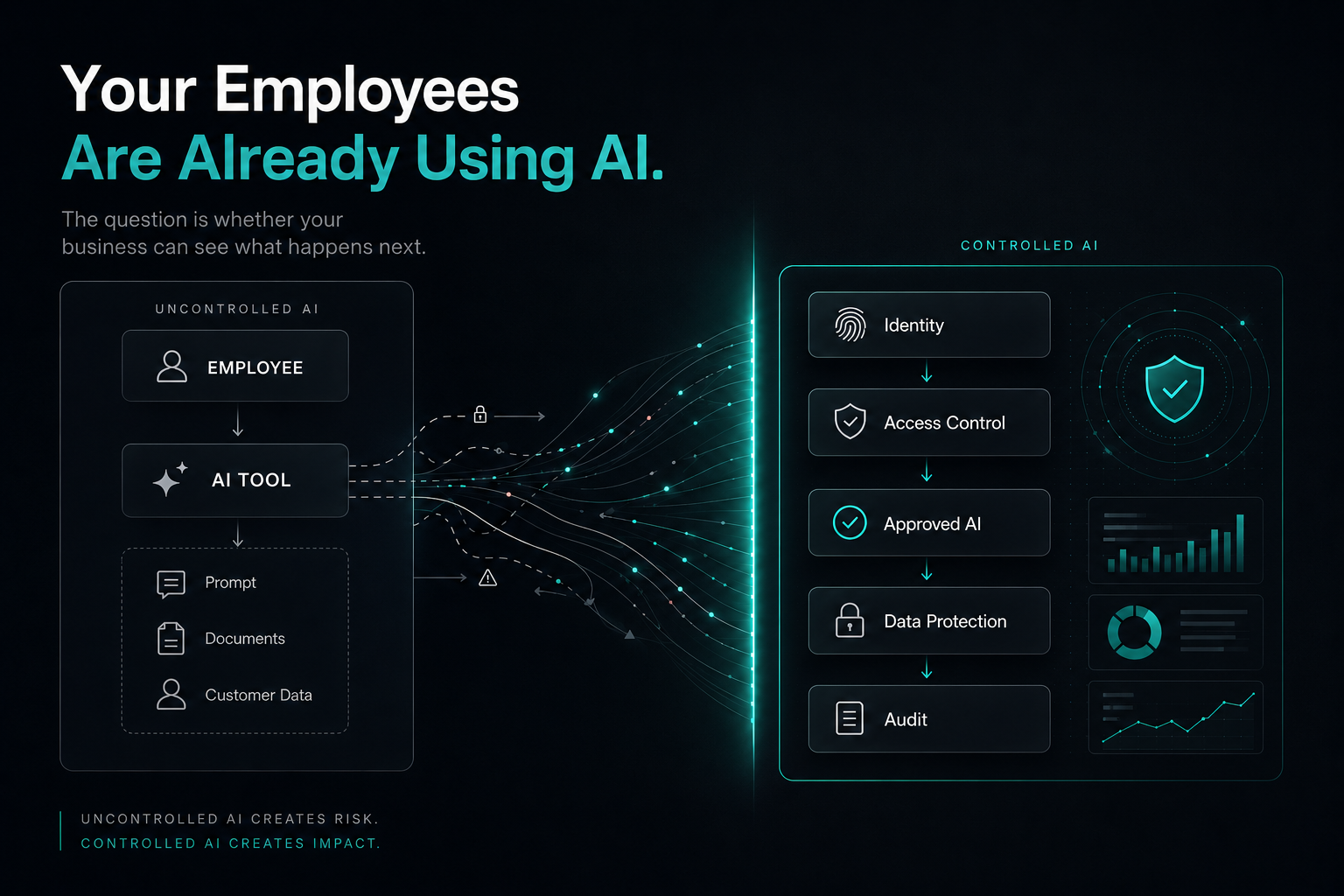
Shadow AI refers to employees using AI tools that have not been formally approved, integrated, or governed by an organisation. The intention is usually harmless: an employee is trying to complete a task faster.
The risk comes from everything around that interaction — what information is shared, where it goes, what the AI produces, and what happens next.
The solution is not necessarily to ban AI.
The better approach is to make AI useful inside a system the business understands and controls.
The Problem Isn't That Employees Use AI
It is tempting to treat employee AI usage as a policy problem.
An employee copies a customer message into an AI assistant because they want help writing a response.
A finance employee uploads a document to extract information.
A developer provides an error message to an AI coding assistant.
A manager uses an AI tool to summarise a meeting.
From the employee's perspective, these are simply productivity tools.
The problem appears when those actions happen without a clear understanding of:
- what data is being shared
- which tools are being used
- what access the AI has
- how the output is validated
- who is responsible for the final decision
- what is recorded for future review
In other words, the issue is not the existence of AI.
It is the lack of a controlled workflow around it.
A business may have strong access controls inside its own applications, but an employee can accidentally bypass those controls by copying information into an external AI service.
That creates a gap between the company's intended data architecture and the way work is actually being done.
What Shadow AI Looks Like in a Real Business
Shadow AI rarely looks dramatic.
It can be as simple as an employee taking information from a business system, providing it to an external AI tool, receiving an answer, and then copying the result back into the company's workflow.
Now imagine that happening across an organisation.
One employee uses one AI assistant.
Another uses a different one.
A third installs an AI browser extension.
Someone else uses an AI meeting transcription service.
A developer relies on an AI coding assistant.
A sales employee uses an AI tool to write customer responses.
Over time, the business may have a growing collection of AI tools operating outside its central systems.
The organisation may know that employees are using AI.
It may not know:
Which tools are receiving which information.
That distinction matters.
AI adoption without visibility can create unnecessary risk.
Four Risks Businesses Should Understand
1. Data Leakage
Employees may accidentally provide sensitive information to tools that are not approved for that type of data.
That information could include:
- Customer details
- Financial records
- Contracts
- Internal documents
- Product information
- Business strategy
- Source code
- Confidential correspondence
The problem does not require malicious behaviour.
A simple copy-and-paste can be enough.
Good security architecture is designed around the principle that sensitive information should only move through known and controlled paths.
AI workflows should follow the same principle.
2. Access Without Context
A normal business application might have a clear permission model, with authentication, roles, permissions, and controlled access to data.
An employee using an external AI tool may bypass that model entirely.
The AI may not know that a particular employee should be allowed to access one customer record but not another. It may not know which documents are confidential. It may not understand internal business roles.
That means AI should not automatically be treated as a trusted gateway to every piece of company information.
A better approach is to provide the AI with only the information required for the task and enforce access rules before that information reaches the model.
3. No Audit Trail
Suppose an AI system generates an important recommendation.
Can the business answer:
- Who triggered it?
- What information was provided?
- Which system produced the result?
- What did the AI return?
- Was the output reviewed?
- What action followed?
- Can the decision be traced later?
If the answer is no, the organisation has a visibility problem.
For many everyday tasks, that may simply be inconvenient.
For financial, operational, legal, compliance-related, or customer-sensitive workflows, it can become a serious issue.
AI should not become an invisible step inside an important business process.
Important AI-assisted actions should be observable.
4. Uncontrolled Decisions
AI output can be useful without being automatically correct.
This matters whenever AI is involved in decisions that affect customers, employees, finances, compliance, contracts, access, or operational commitments.
The goal should not be to remove people from every decision.
Instead, businesses should determine which decisions can be automated safely and which require validation, approval, or human judgement.
That creates a more practical balance between automation and accountability.
AI Adoption Should Be Part of the Business System
Instead of employees independently connecting random AI tools to business information, AI should increasingly become part of the software and workflows the organisation already controls.
A controlled AI workflow should consider:
- authentication
- access control
- data filtering
- approved AI services
- output validation
- human review where necessary
- business actions
- audit history
This does not make AI less useful.
It makes AI part of the business system rather than an isolated tool sitting outside it.
You Don't Need to Ban AI
A complete ban is rarely a practical long-term strategy.
People use AI because it saves time.
If an organisation blocks every AI tool without providing useful alternatives, employees may still find ways to use them.
The better strategy is to make the safe path the easiest path.
Consider a customer-service example.
Instead of telling employees:
"Do not paste customer messages into AI tools."
the business can provide an internal response assistant.
The employee submits the customer request through the company's own system. The application retrieves only the customer information the employee is authorised to access. An approved AI service generates a response draft, business rules are applied, and the employee reviews the result before it is sent.
The employee still gets the benefit of AI.
The organisation retains control over:
- access
- data
- workflow
- review
- accountability
That is a much more sustainable model.
Build AI Around Your Data — Not the Other Way Around
One of the easiest mistakes to make is choosing an AI model first and then trying to find a business problem for it.
The process should usually happen in the opposite direction.
Start with the business process.
Then understand the data involved.
Then define access rules and business rules.
Then determine where AI can help.
Finally, define what humans and automation should do around it.
The AI model is one component of the solution.
It is not the entire solution.
For example, imagine an accounts-payable workflow.
The problem is not:
"We need AI."
The problem might be:
"Employees spend too much time reading incoming invoices, checking information, routing approvals, and entering the same data into multiple systems."
Now AI has a clear role.
It can extract information, classify documents, identify missing fields, compare information, recommend routing, and flag unusual cases.
The surrounding software handles authentication, permissions, business rules, workflow, approvals, integrations, and audit history.
That is a real business system.
Where AI Should Have More Freedom
Not every task requires the same level of AI autonomy.
A useful way to think about it is in levels.
Level 1 — Read
The AI can access approved information.
For example, it can search internal documentation or retrieve information from a controlled knowledge base.
Level 2 — Recommend
The AI can suggest what should happen next.
For example, it can recommend which support request should be prioritised.
Level 3 — Draft
The AI prepares an action for human review.
For example, it can draft a customer response or prepare a summary for an employee.
Level 4 — Execute
The AI can perform a specific approved action.
For example, it can update a CRM field or create a task.
Level 5 — Operate Autonomously
The AI can execute a defined workflow within strict boundaries.
For example, it might categorise incoming requests, create tasks, send approved notifications, and escalate exceptions.
As AI receives more authority, the surrounding controls should become stronger.
That includes:
- access control
- validation
- monitoring
- logging
- exception handling
- human escalation
The goal is not maximum autonomy.
It is appropriate autonomy.
AI Doesn't Need More Freedom. It Needs Better Boundaries.
A common misconception is that a better AI agent is one that can do everything.
In a business environment, that is rarely the right objective.
A useful agent should have:
- a clear purpose
- limited data access
- defined tools
- business rules
- observability
- escalation paths
This creates controlled autonomy.
For example, a lead-management agent might be allowed to classify an enquiry, score the lead, assign it to a sales representative, draft a response, and create a follow-up task.
It might not be allowed to change pricing, approve a contract, issue a refund, or delete customer records unless those actions are explicitly permitted by the business workflow.
That distinction is fundamental.
Start With One Workflow
Businesses do not need to redesign everything at once.
Pick one process.
Then map it.
For example, imagine a lead arriving through a website.
Today, an employee may need to review the enquiry, copy the information into a CRM, decide whether it is qualified, send a response, and create a follow-up task.
Now identify:
Manual steps
Which steps require people?
Repetition
Which steps happen almost every time?
Decisions
Where does someone decide what happens next?
Handoffs
Where does information move between systems?
Exceptions
Which cases do not follow the normal path?
Delays
Where does the process wait?
Once those questions are answered, you have something much more useful than an abstract AI idea.
You have a workflow that can actually be redesigned.
The Best Automation Opportunities Often Look Boring
The most valuable automation project in a business may not look impressive in a product demonstration.
It may involve:
- processing invoices
- following up unpaid accounts
- collecting onboarding documents
- routing support requests
- updating CRM records
- approving internal requests
- generating recurring reports
- checking missing information
- coordinating project tasks
- reconciling information between systems
These tasks sound ordinary.
That is exactly why they are interesting.
They happen repeatedly.
And anything repeated at scale deserves to be examined.
A Simple Test for an AI Project
Before building an AI-powered workflow, ask five questions.
1. What happens today?
Describe the current process without mentioning technology.
2. What is expensive or frustrating?
Find the actual bottleneck.
3. What can software remove?
Look for repetition, handoffs, waiting, and unnecessary manual work.
4. Where does AI help?
Use AI for tasks that genuinely benefit from interpretation, classification, extraction, generation, or decision support.
5. Where should humans remain involved?
Define the boundaries before deployment.
Then ask one final question:
How will we know the new workflow is better?
That might mean measuring:
- processing time
- response time
- manual steps
- error rate
- completion rate
- backlog
- exception rate
- employee effort
If the new workflow cannot demonstrate meaningful improvement, adding AI may not be worthwhile.
The New Way to Think About AI Projects
Instead of asking:
"What can we build with this AI model?"
start with:
"What is our business repeatedly doing that should not require this much human effort?"
Then work backward.
Start with the business problem.
Understand the current workflow.
Identify the bottleneck.
Design the system.
Automate what is predictable.
Apply AI where interpretation or decision support is genuinely useful.
Keep humans involved where judgement or accountability matters.
Then measure the outcome.
That is the difference between adding AI to a business and redesigning a business process around better software.
AI Is Becoming a Component, Not a Destination
The next stage of business AI will not simply be employees opening a separate AI chat window every time they need assistance.
AI will increasingly become part of the software businesses already use.
A CRM can use AI to analyse incoming leads.
A document-management system can use AI to extract and validate information.
A customer-service platform can use AI to classify requests before routing them.
An internal operations system can use AI to identify exceptions and recommend the next action.
The important shift is this:
AI moves from a destination to a component.
The employee does not need to think about which model is running underneath.
They simply experience a better workflow.
The Real Value Isn't "Using AI"
A business does not automatically benefit because it has an AI agent.
It benefits when a process becomes:
- faster
- clearer
- more reliable
- easier to manage
- less repetitive
- better connected
- more measurable
Imagine two proposals.
Proposal A
We can build an AI-powered document assistant.
Interesting, but vague.
Proposal B
We can redesign the process between receiving an invoice and approving it by extracting the required information, validating it against your rules, routing exceptions to the right person, and updating the accounting system automatically.
The second proposal is much more useful.
It starts with a business problem.
AI is simply one of the technologies used to solve it.
Final Thought
Your employees do not necessarily need to stop using AI.
Your business needs to understand how AI is being used, what information reaches it, what authority it has, and where the resulting actions go.
AI adoption without control can create unnecessary risk.
AI adoption with thoughtful architecture can become part of an organisation's infrastructure.
The goal is not to keep AI out of the business.
It is to make sure AI works inside a system your business understands, manages, and can improve.
The most valuable AI implementation may not be the one that looks the most impressive.
It may simply be the one that makes a difficult process feel effortless.
Want this thinking applied to your project?
Tell us what you’re building and we’ll give you an honest view of the right approach.
Start the conversation